
Compress Photo to KB
Compress your phototo the exact KB limit
Does a portal require a photo under 50 KB, 100 KB, or another exact limit? ExactKB automatically finds the right balance of resolution and quality, then verifies the real size in bytes.
- Quick targets for 20, 50, 100, 200, 300 and 500 KB
- Custom limits down to the exact kilobyte
- Clear PASS or FAIL confirmation before upload
- On-device processing — your photo never leaves your phone
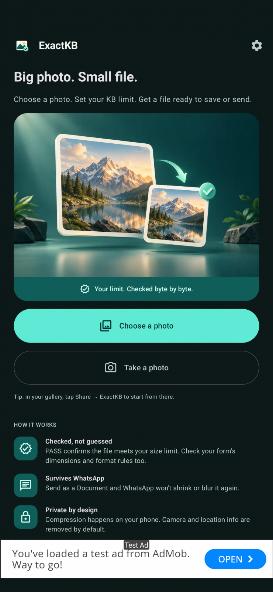
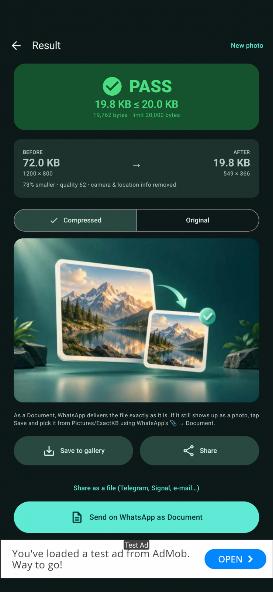
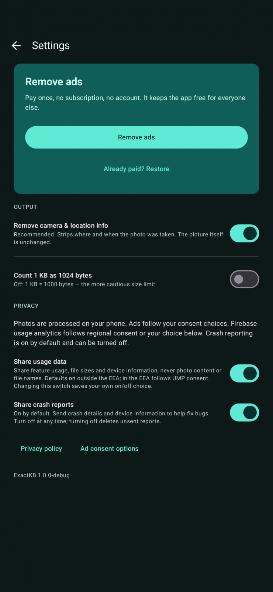
From oversized photo to accepted file
Choose the portal's limit. ExactKB optimizes the image and confirms whether it fits before you submit it.
Choose a photo
Select an image from your gallery or capture a document directly in the app.
Set the exact limit
Use a common preset or enter any custom size required by the online form.
Export the verified result
See the real byte count, then save or share the file without further compression.
Ready for official portals and online forms
Passports and visas
DS-160, Schengen visas, e-Visa and immigration systems with strict limits.
Exams and admissions
University, certification and civil-service forms that require small photos.
CV, identity and HR
Profile photos, ID scans and files prepared for recruitment portals.
Email and web portals
Attachments and online forms that reject images above their size ceiling.
Typical KB upload limits for visas, jobs, and forms
Many portals check the file size before you can submit, while a phone photo is usually several megabytes. Limits vary from portal to portal, so always check the requirement shown on the form.
Exams, admissions & test centers
Limits found on some application forms for small portraits or scanned signatures.
Job boards & HR profiles
A ceiling some platforms use for profile photos and small attachments on online forms.
US DS-160 visa form
The US DS-160 form requires a square JPEG photo between 600×600 and 1200×1200 pixels, no larger than 240 KB.
ID scans, forms & product uploads
Balances crisp text legibility on document scans or storefront catalog photos against strict server attachment caps.
Tip: Aim slightly below strict caps (for example 230 KB for a 240 KB portal rule) to account for portals that measure binary KiB (1024 B) vs decimal KB (1000 B).
Choose. Compress. Verify.
Three clear screens take you from the original photo to an upload-ready result.
Your photos stay on your phone
Compression runs entirely on your device and works offline. ExactKB removes sensitive EXIF information by default, including GPS coordinates, timestamps, and camera details.
A simple utility with no subscription
Compression features are available with minimal ads. Remove ads permanently with one optional in-app purchase — no recurring subscription or locked feature tiers.
One optional lifetime purchaseFrequently asked questions
Can I compress a photo to exactly 100 KB?
Yes. Choose the 100 KB preset or enter a custom ceiling. The app optimizes quality and dimensions to stay below it, then shows the exact output size in bytes.
Does ExactKB upload my photos to a server?
No. Processing happens locally on your phone, and photo compression works without an internet connection.
Why should I share the image as a WhatsApp document?
WhatsApp may recompress normal photo attachments. Document sharing preserves the exact file and byte size produced by ExactKB.
Does ExactKB work for DS-160 visa photos (under 240 KB) or job portals?
Yes. Enter 240 KB—or use the 20, 50, or 100 KB quick targets for other portals—and ExactKB compresses locally until the real byte count passes.
Should I crop my photo before compressing to an exact KB ceiling?
Yes. Crop to any required aspect ratio first (for example, the 1:1 square photo the DS-160 requires), then run ExactKB so the final uploaded file stays inside the limit.
What happens to location and camera data?
Sensitive EXIF metadata, including GPS location, timestamps, and camera parameters, is removed by default.
Where can I download ExactKB?
ExactKB is available on Google Play for phones and tablets running Android 8.0 or later.
The right photo. The right file size.
Download ExactKB and prepare photos for portals, forms, and applications without repeated guesswork.

Need a fast offline-first Android app or custom media utility built for your product or team?