If you run or build a WooCommerce store operating in Romania, compliance with the national RO e-Factura clearance system usually comes with one standard recommendation: pay €10–€50 every month for an external invoicing SaaS tool, install their bridge plugin, and route every customer order through their servers.
That setup makes sense if a merchant already relies on an external accounting suite for physical POS tills and multi-warehouse inventory. But for pure-play WooCommerce stores—or international agencies managing Romanian e-commerce storefronts—adding an external middleman means recurring fees, extra API points of failure, and sensitive customer order data sitting on third-party servers.
We built and open-sourced the free WooCommerce e-Invoice Plugin (GPLv2) to connect WordPress directly to Romania's official ANAF SPV gateway.
Direct Architecture: WordPress Server ↔ ANAF SPV
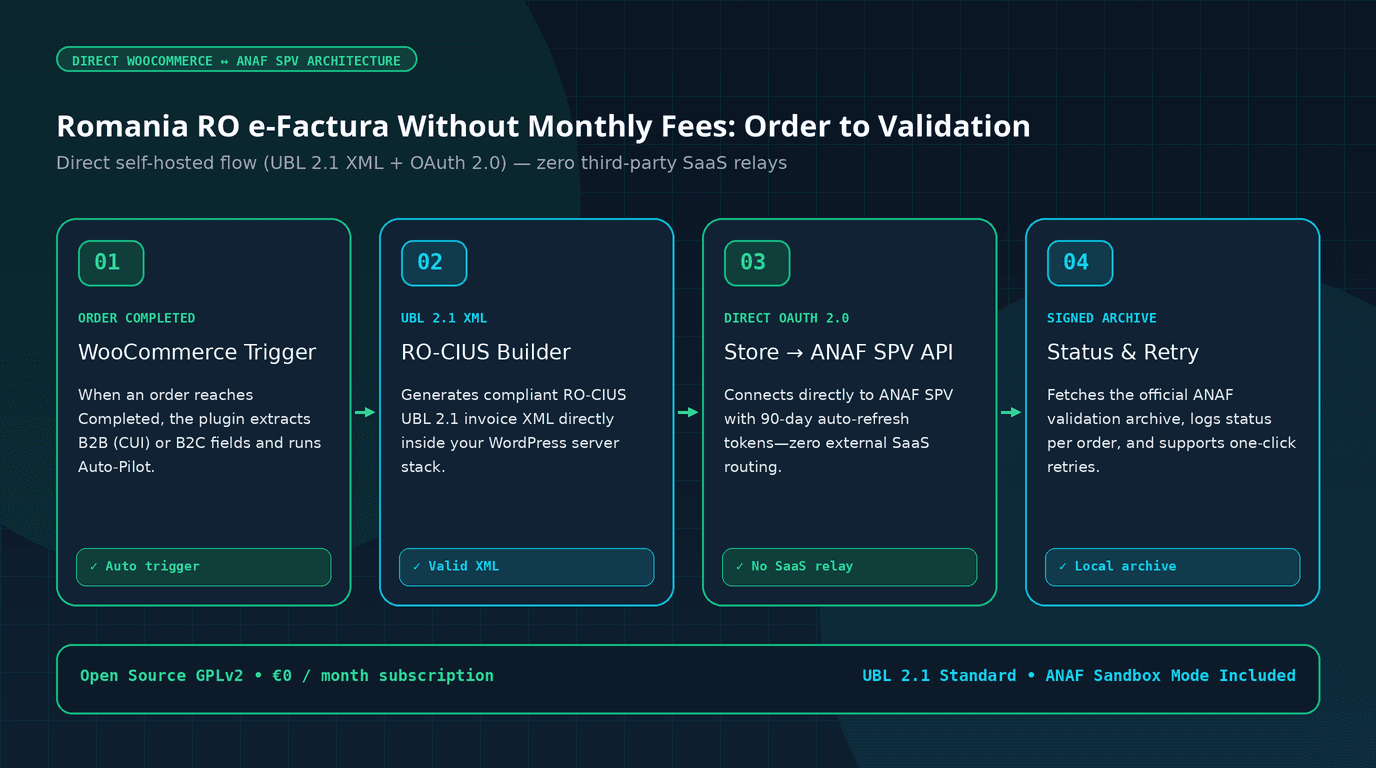
Rather than pushing orders out to a third-party SaaS platform to generate XML on your behalf, the plugin runs the entire compliance pipeline inside your store's own infrastructure:
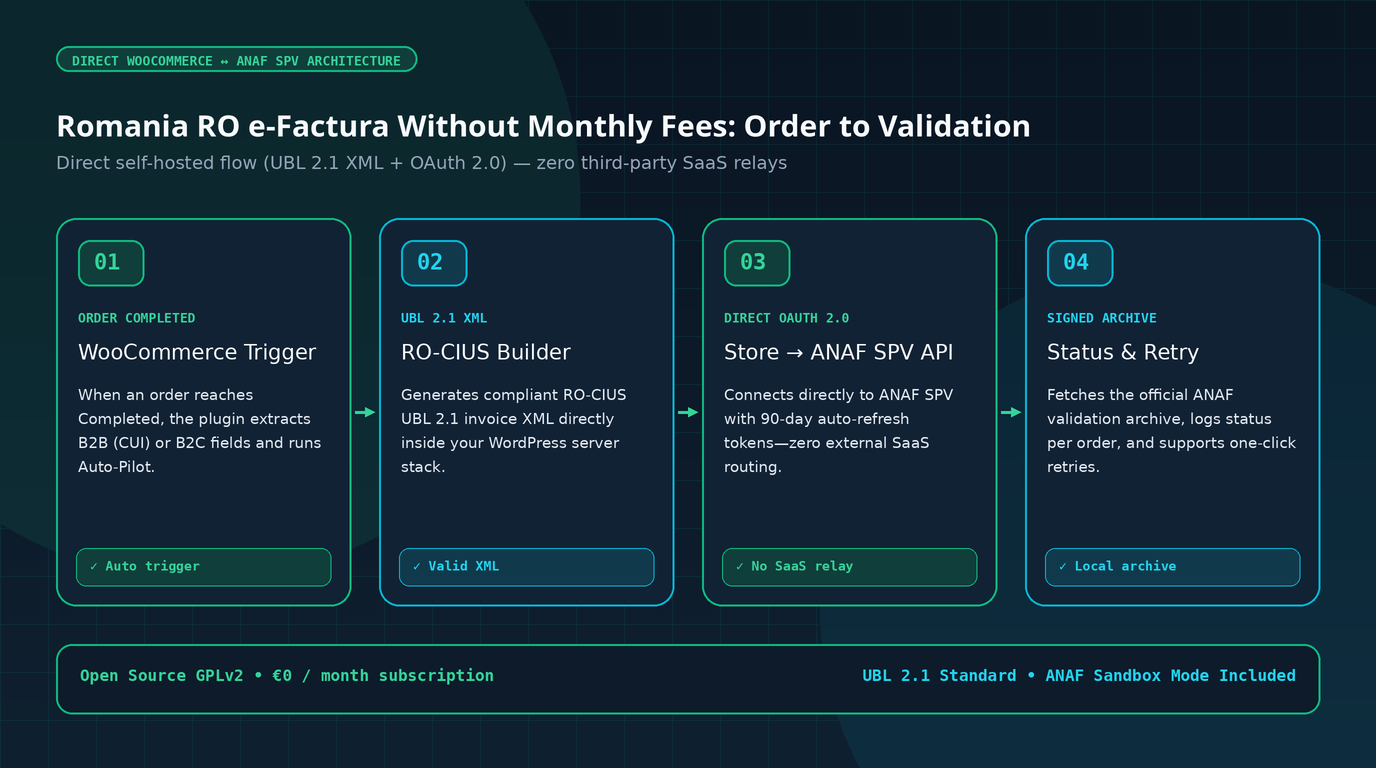
- Order-Completed Auto-Pilot: Instead of firing premature invoices on pending or failed carts, Auto-Pilot triggers generation and SPV submission only when a WooCommerce order transitions to
Completed. - Self-Hosted RO-CIUS UBL 2.1 XML: Builds the structured UBL 2.1 XML payload directly from WooCommerce order lines, taxes, and customer billing/tax fields.
- Direct OAuth 2.0 Connection: Authenticates straight against the official ANAF SPV API (
Authorization Code Flowwith 90-day automatic token refresh)—invoice payloads never touch our servers or external relays. - Validation Tracking & Signed Archive: Monitors ANAF clearance status, fetches the signed validation archive, and surfaces rejection messages directly inside WooCommerce.
Romania RO e-Factura Rules in 2026 (Including Law 88/2026)
For engineers and operators supporting Romanian merchants, understanding the current rules avoids unnecessary over-engineering and missed statutory deadlines:
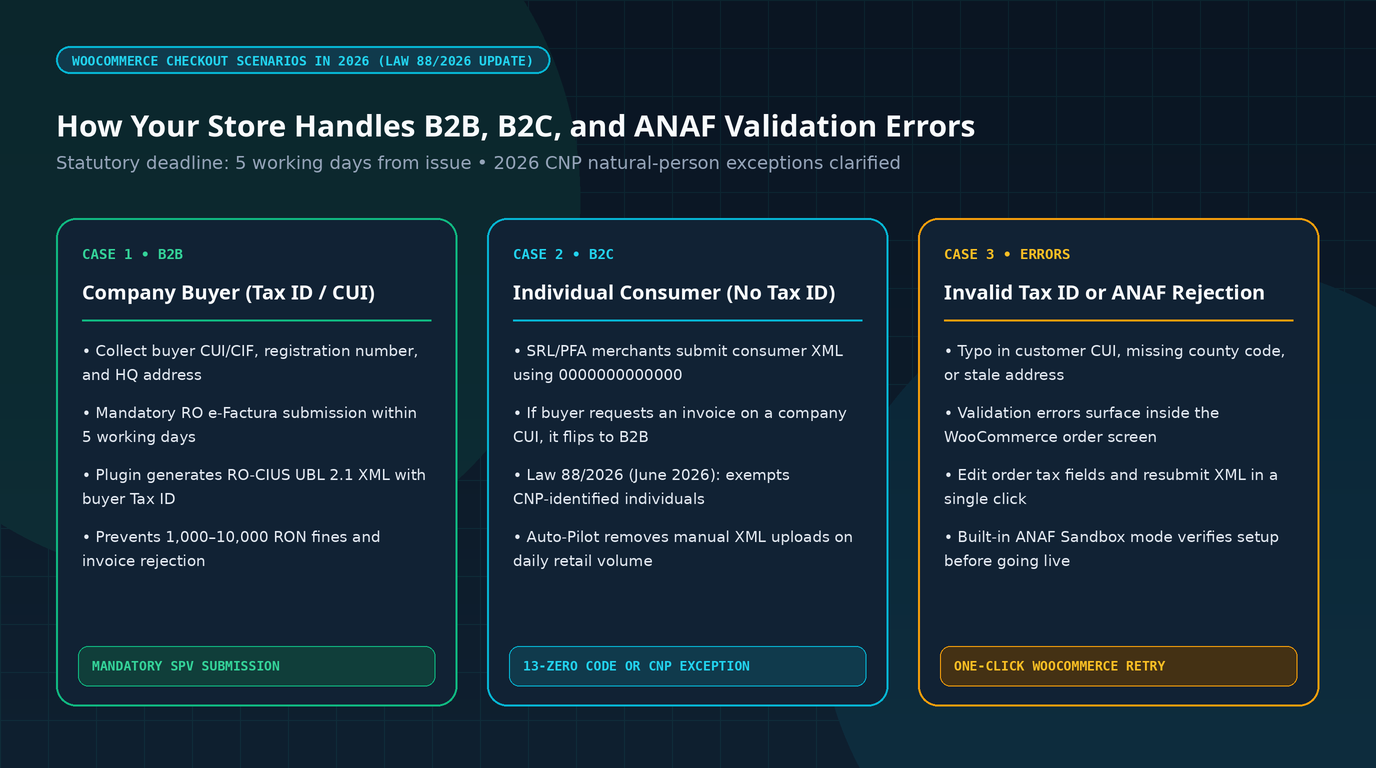
- 5-Working-Day Statutory Deadline: Invoices subject to e-Factura reporting must be uploaded within 5 working days of issue (excluding weekends and Romanian public holidays, and no later than the 15th of the following month under the Fiscal Code).
- B2B Transactions (SRL / PFA with CUI/CIF): Strictly mandatory. Late or missing submissions carry statutory fines of 1,000–2,500 RON for micro-enterprises/sole traders and 5,000–10,000 RON for medium and large taxpayers, while unvalidated invoices risk losing tax deductibility for the buyer.
- B2C Consumers & Law 88/2026 Clarifications: Incorporated Romanian stores (SRL/PFA) issuing B2C invoices to individual consumers still report them using the standardized 13-zero buyer identifier (
0000000000000) whenever the buyer does not provide a tax ID or CNP. Meanwhile, Law 88/2026 (effective June 1, 2026) exempted natural persons conducting economic activities identified solely by their personal CNP (such as certain farmers, IP income earners, or tourist accommodation hosts), making SPV usage optional for those individuals.
4 Real-World WooCommerce Situations
Here is how store owners and WordPress teams use the plugin in practice:
Situation 1: Mixed Daily B2C Orders Plus Occasional B2B Corporate Buyers
An electronics, auto-parts, or homeware store handles dozens of retail orders daily alongside five or ten company orders requesting an invoice with a corporate Tax ID (CUI/CIF).
Manually uploading XML files in the ANAF portal quickly falls behind the 5-working-day limit. With Auto-Pilot enabled, every order marked Completed at dispatch automatically submits valid RO-CIUS XML—populating the corporate CUI for B2B buyers and the consumer structure for B2C orders.
Situation 2: ANAF Rejects an Invoice Due to a Buyer Typo at Checkout
The number-one failure mode in e-commerce e-invoicing is dirty customer input: a typo in a corporate CUI, a missing county code, or an invalid postal string.
Instead of hunting through external dashboard logs and re-uploading XML files manually, the WooCommerce plugin surfaces the exact ANAF validation status and error message on the order record. Your ops team fixes the billing field and triggers a one-click resubmission right inside WordPress.
Situation 3: Privacy-Sensitive B2B Store Avoiding Third-Party SaaS Relays
Merchants selling medical equipment, negotiated B2B wholesale contracts, or sensitive enterprise hardware often prefer not to stream full customer lists and line-item pricing through external SaaS invoicing APIs.
Because e-Factura WooCommerce runs natively inside your WordPress installation under the GPLv2 open-source license, the network path stays strictly Your Server → Official ANAF SPV API, and your developers can audit every line of code.
Situation 4: Safe Pre-Launch Testing Using Built-In ANAF Sandbox Mode
Testing invoicing logic directly on a live company Tax ID risks polluting real fiscal numbering or triggering live compliance errors.
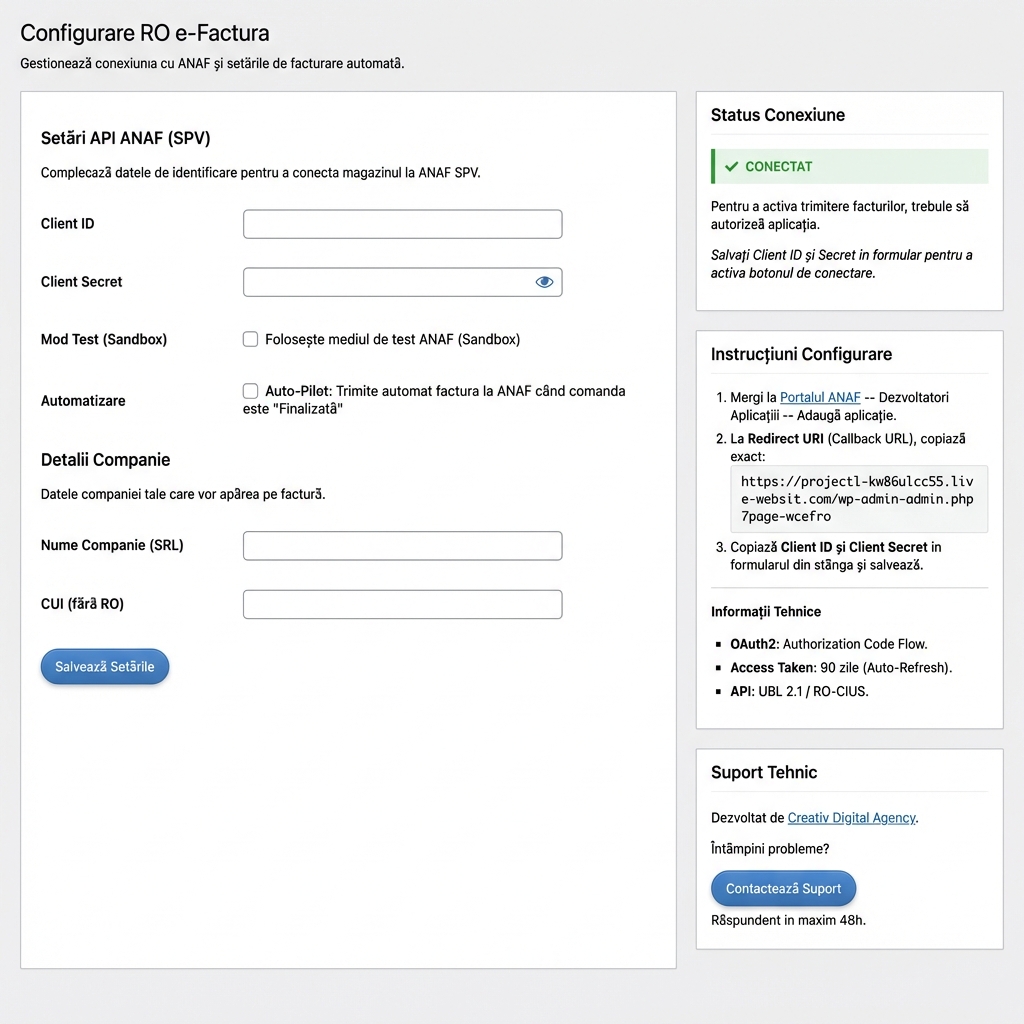
The plugin's settings screen includes a single Sandbox Test Mode toggle. You can register an ANAF test OAuth client, run end-to-end B2B and B2C checkout tests on staging, verify XML validation signatures, and only switch Sandbox off when production is ready.
Step-by-Step Setup Overview
Before connecting WooCommerce, the merchant needs one mandatory external prerequisite: a qualified digital certificate registered inside ANAF SPV on the company's CUI (see our ANAF SPV registration guide for details).
- Install the plugin: Download the release from our official GitHub repository and upload it via
WordPress Admin → Plugins → Add New → Upload Plugin. - Copy the Callback URI: Grab the exact
Redirect URIgenerated in the plugin's right-hand configuration instructions panel. - Register an OAuth App in ANAF Developer Portal: Authenticate with the company's qualified digital certificate, register the Redirect URI, and copy your
Client IDandClient Secret. - Authorize OAuth 2.0: Enter the credentials plus company name and CUI (without
ROprefix), save settings, and authorize. Access tokens auto-refresh every 90 days. - Validate in Sandbox, then enable Auto-Pilot: Complete one B2B and one B2C test order in Sandbox mode before enabling automatic submission on live
Completedorders.
Honest Comparison: Direct GPLv2 Plugin vs. External SaaS vs. Manual Upload
| Dimension | Direct WooCommerce Plugin (GPLv2) | External SaaS (SmartBill / Oblio) | Manual SPV Upload |
|---|---|---|---|
| Monthly subscription | €0 / month | €10–€50 / month | €0, but consumes hours weekly |
| Invoice data path | Direct: your server → ANAF SPV | Routed via third-party SaaS servers | Manual XML export & browser upload |
| Inventory / multi-channel ERP | Native WooCommerce invoicing | Includes warehouse stock, POS & full accounting sync | Handled manually outside store |
| Source code ownership | 100% Open Source (GPLv2) | Closed source | N/A |
| Best fit when… | WooCommerce is your main storefront and you want €0/month automation | You already sync multi-channel retail POS or complex stock systems | You issue fewer than 5 invoices/month |
When another approach fits better
If a merchant already operates physical retail locations, multi-warehouse stock, or automated SAGA/ERP pipelines via SmartBill or Oblio, keeping that SaaS as the single numbering authority (covered in our Shopify & WooCommerce e-Invoice integration guide) makes more sense than duplicating series. Our direct plugin is built specifically for WooCommerce-first merchants who want full control with zero subscription rent.
Need Help With Custom WooCommerce Checkout or SPV Onboarding?
The base plugin is free and open-source on GitHub. If your store uses custom B2B checkout validation, bespoke ERP hooks, or you simply want our engineers to handle the ANAF Developer OAuth setup and production Sandbox verification, visit our WordPress & WooCommerce development services or contact our team directly.
Frequently Asked Questions
Do I still need a qualified digital certificate?
Yes. ANAF requires a qualified electronic signature registered in SPV for the merchant's Romanian CUI to create the OAuth 2.0 client credentials and authorize invoice submissions.
Can this run alongside SmartBill or Oblio on the same store?
You should never run two automatic e-Factura submitters on the same orders, as that would generate duplicate fiscal submissions. Choose this plugin when you want WooCommerce to submit directly without external SaaS billing software.
What happens when ANAF rejects an invoice?
The error status and reason returned by ANAF appear directly in the WooCommerce order dashboard so you can fix the buyer's tax ID or address and resubmit in one click.
Does it support non-VAT-registered companies?
Yes. RO-CIUS UBL 2.1 XML generation respects the tax configuration set inside WooCommerce, supporting both VAT-registered and non-VAT-registered Romanian businesses.