Every growing Magento 2 or Mage-OS merchant eventually hits the same custom-data wall. B2B buyers need Purchase Order numbers and VAT IDs at the payment step; logistics teams need preferred delivery windows and gate entry codes stored per shipping address; and personalization or print teams need engraving text and artwork file uploads right on the product page.
In the traditional Magento extension marketplace, solving those requirements forces agencies to stack three to five separate modules from one or more vendors: an Order Attributes extension for checkout, a Cart attributes add-on, a Customer Attributes extension, a Product Options module, and often another paid compatibility bridge just for Hyvä Checkout. Every Magento minor upgrade turns into a multi-module regression headache, and annual support renewals quietly compound.
We built CDA Custom Fields for Magento 2 to replace that fragmented stack with a single, clean, Composer-delivered extension built natively for Magento 2.4.6–2.4.9, Mage-OS 3.0, and Hyvä Checkout.
Why Legacy Custom-Field Extensions Break on Hyvä Checkout
On legacy Luma themes, Magento checkout runs on KnockoutJS and uiRegistry. Most long-standing order-attribute modules wire their inputs using Knockout observables and RequireJS mixins.
When a store adopts Hyvä Themes and Hyvä Checkout for Core Web Vitals and lean frontend performance, KnockoutJS and RequireJS are stripped out completely in favor of server-rendered Magewire components, Alpine.js, and Tailwind CSS. Legacy extensions expecting ko.observable or uiRegistry either throw undefined JS errors or render inputs that silently fail to persist to the active Magento Quote when shoppers move between steps.
That is why genuine Hyvä compatibility cannot be patched with CSS alone—it requires native Magewire state binding for checkout steps and Tailwind templates across storefront surfaces.
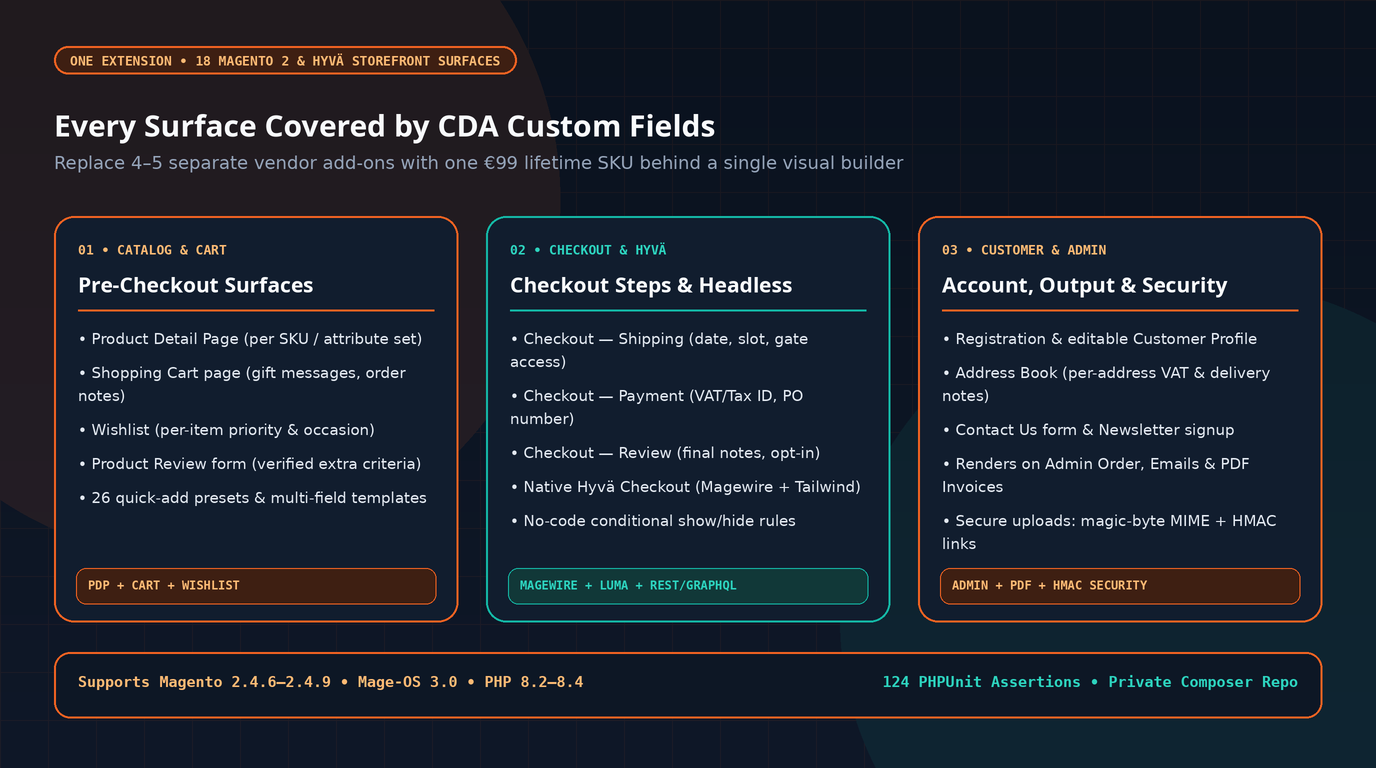
All 18 Storefront Surfaces Behind One Visual Builder
Instead of managing disconnected admin grids for checkout, customer accounts, and product pages, CDA Custom Fields unifies 18 storefront surfaces inside one interface:
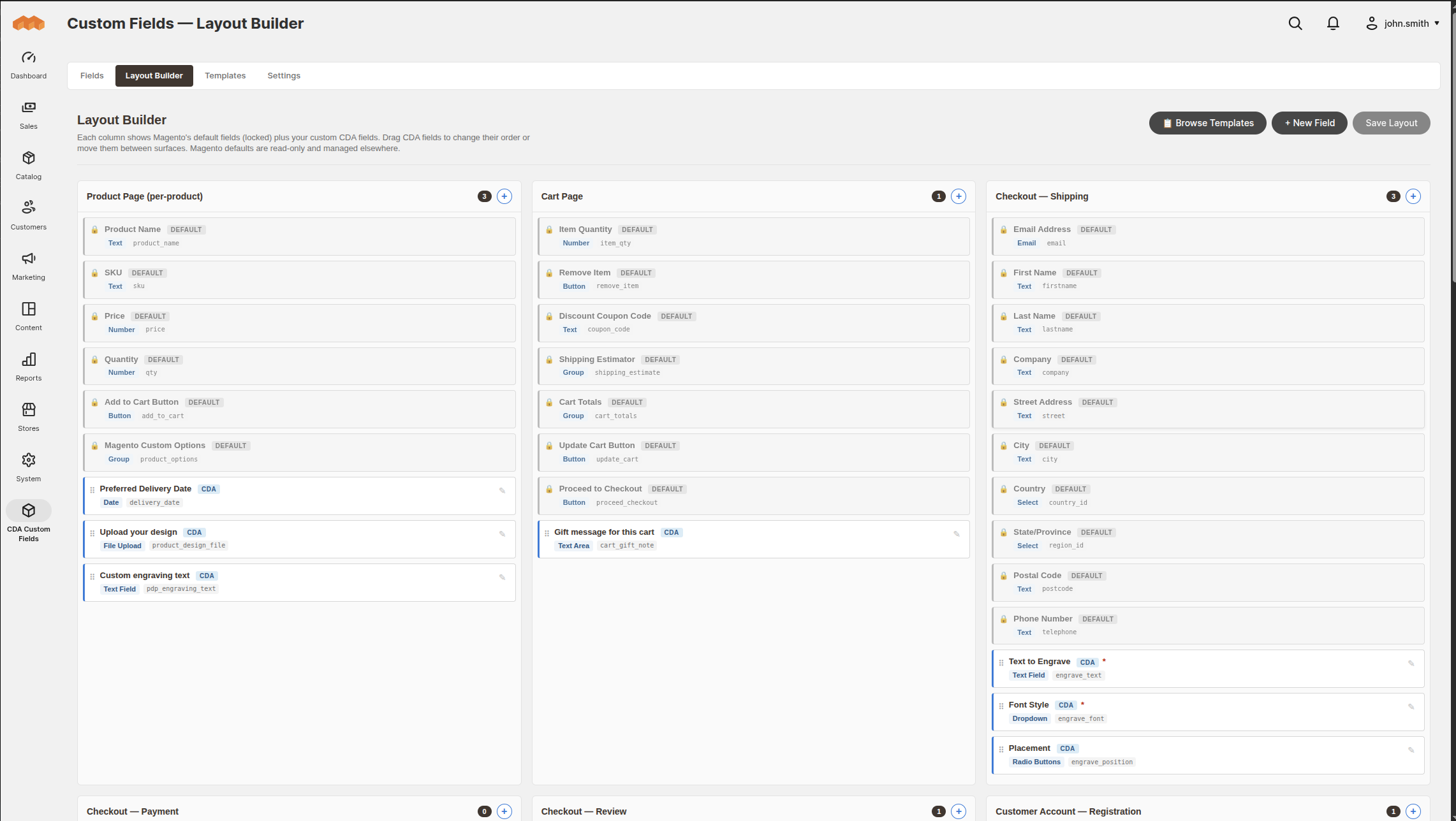
Inside the Visual Layout Builder, store managers or developers drag and drop custom fields between checkout steps (Shipping, Payment, Review), the Product Detail Page, Cart Page, Customer Registration, Profile, Address Book, Contact form, Reviews, Newsletter, and Wishlist—with zero manual XML layout editing.
5 Real-World Magento 2 Situations Where CDA Eliminates Custom Glue Code
Here is how merchants and Magento engineering teams apply the extension across five common operational scenarios:
Situation 1: B2B & Wholesale Stores Needing PO Numbers, VAT IDs, and Multi-Depot Notes
Hybrid B2C/B2B merchants need very different inputs depending on who is logged in:
- B2B / Wholesale customer groups must provide Company Name, VAT / Tax ID, Purchase Order (PO) Number, and optionally a Tax Exemption Certificate during checkout—without adding friction for retail shoppers.
- Trade buyers shipping to multiple warehouses need distinct VAT IDs and delivery instructions saved per address in the Customer Address Book.
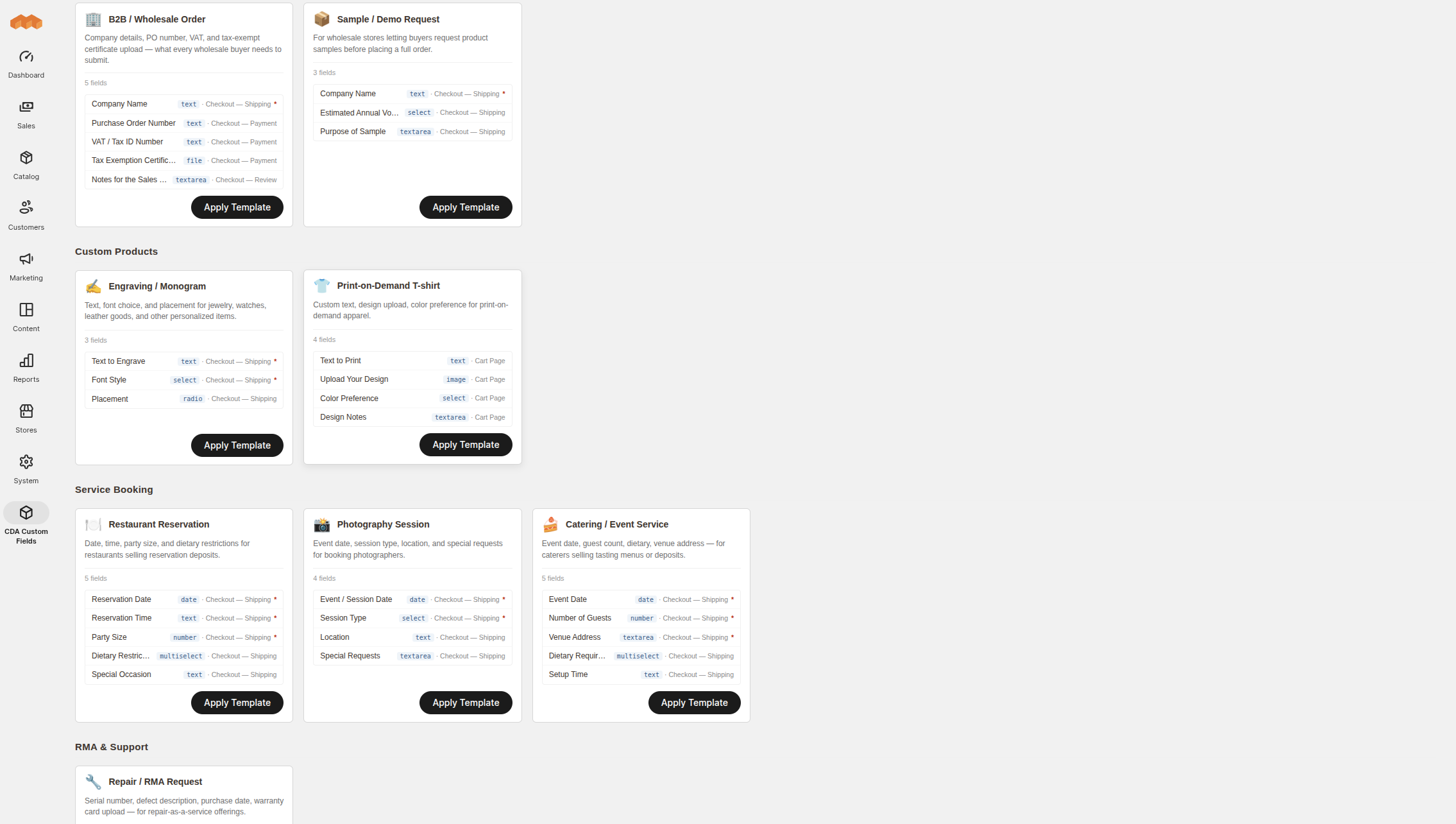
With CDA, you apply the pre-built B2B / Wholesale Order multi-field template in one click, scope those fields to specific Customer Groups and Store Views, and the captured attributes automatically appear on Admin Orders, Customer My Orders, transactional emails, and PDF invoices.
Situation 2: Personalized Products, Print-on-Demand & Custom Engraving (With Secure Uploads)
Merchants selling engraved jewelry, custom apparel, signage, or bespoke manufacturing runs need product-level capture—such as engraving text, font dropdowns, placement radios, and customer artwork file uploads—scoped specifically to personalized attribute sets or SKUs.

Crucially, CDA treats file uploads as a security boundary rather than an afterthought: uploaded files go through magic-byte MIME validation (checking actual file headers rather than trusting filenames) and are served via HMAC-SHA256 signed download URLs protected by a 4-tier ownership ladder—preventing unauthenticated URL enumeration against customer artwork or tax documents.
Situation 3: Gifting, Scheduled Delivery & Service Bookings Without Cluttering Checkout
For florists, bakeries, furniture retailers, or hospitality/event bookings, showing six extra fields to every buyer lowers checkout conversion. You want clean conditional prompts ("Is this order a gift?" or "Leave at door if no answer?").
CDA includes no-code conditional logic (equals, contains, empty rules across fields) so secondary fields such as Recipient Name, Gift Message, and Preferred Delivery Date appear dynamically only when relevant. You can start from 26 quick-add single presets or one-click multi-field Use Case Templates (Birthday Gift, Wedding Gift, Engraving, Print-on-Demand T-shirt, Restaurant Reservation, Photography Session, Catering, and Repair / RMA).
Situation 4: Upgrading to Hyvä Checkout Without Paying Compatibility Taxes
Many merchants moving to Hyvä discover halfway through implementation that existing checkout-field vendors charge extra for a separate Hyvä compatibility module—or only document Luma support.
CDA ships native Magewire checkout components and Tailwind storefront templates in the single €99 SKU and auto-detects Hyvä themes cleanly, eliminating add-on compatibility fees and brittle RequireJS shims.
Situation 5: Headless / PWA Storefronts and ERP Sync via REST + GraphQL
When your store runs a decoupled frontend (such as Hyvä React or a custom PWA) or syncs order metadata into an ERP/WMS, custom attributes locked purely inside checkout PHTML templates create integration dead ends.
CDA provides first-class REST and GraphQL coverage—including full cart/order custom field queries and setCartCustomFields mutations—so decoupled frontends and external ERPs read and write the exact same validated attributes.
Honest Comparison: 3-Year Cost & Single-SKU Coverage
Comparing CDA against public vendor listings from May 2026 (documented on the CDA Custom Fields page) highlights the difference between bundling all 18 surfaces in one lifetime license versus stacking separate modules with annual support renewals:
| Capability | CDA Custom Fields | Amasty | FME | BSS |
|---|---|---|---|---|
| Storefront surfaces in one SKU | 18 surfaces | ~2 (separate modules for PDP/Cart/Address) | ~2 | ~2 |
| Native Hyvä Checkout (Magewire) | ✓ Included | Not documented | Not documented | Separate compat module |
| Native Hyvä Storefront (Tailwind) | ✓ Included | ✕ | ✕ | ✕ |
| Visual Layout Builder | ✓ Included | Add-on module | Add-on module | ✕ |
| HMAC-signed secure file uploads | ✓ Included | Not advertised | Not advertised | Not advertised |
| One-time license price | €99 | €179 | €99 | €99 |
| Optional support renewal | €0 (lifetime v3.x/v4.x updates) | €79 / yr | €69 / yr | €49 / yr |
| 3-year cost (with support) | €99 | €337 | €237 | €197 |
Clean Developer Workflow & Composer Deployment
Delivered via a private Composer repository and backed by 124 PHPUnit assertions following Magento EQP standards, installation takes three steps:
- Add the private Composer repository and bearer token received on purchase (
composer config repositories.cda composer https://magento.creativdigital.ro). - Require the package (
composer require cda/magento2-custom-fields, pluscda/module-custom-fields-hyva-compatfor Hyvä stores). - Enable
CDA_CustomFields,CDA_CustomFieldsCheckout, andCDA_CustomFieldsGraphQl, then runsetup:upgrade,setup:di:compile, andcache:flush.
Practical note for agencies: loopback and private network hosts (localhost, 10.x, 192.168.x) are exempt from license checks so local development and staging environments work freely, while one license binds cleanly to one production domain.
Planning a Magento 2 Build or Hyvä Migration?
Test live field rendering in the interactive playground on our CDA Custom Fields for Magento 2 page. If you are scoping a new store, an upgrade, or a Hyvä migration, explore our Magento 2 development services, our Magento store cost guide, or contact our engineering team.
Frequently Asked Questions
Will fields stop working if I don't pay a renewal fee?
No. CDA is a €99 one-time lifetime license with zero recurring renewal fees. All future v3.x and v4.x updates ship to your private Composer repository for life.
Which Magento and PHP versions are supported?
Magento Open Source / Adobe Commerce 2.4.6 – 2.4.9, Mage-OS 3.0, PHP 8.2 / 8.3 / 8.4, and Hyvä Themes 1.x / Hyvä Checkout 1.x.
Can I restrict fields to specific products or B2B customer groups?
Yes. Every field supports per-product bindings (by SKU or attribute set), per-customer-group visibility, and per-store-view scoping.